 Field Guide
Field Guide
Field Guide
Claude can now watch you work and turn it into a skill. There is one rule that decides whether a task is worth recording, and almost everyone is getting it backwards.
On 21 July 2026 Anthropic shipped Record a Skill inside Claude Cowork. You screen-record yourself doing a task, talk through it as you go, and Claude turns the demonstration into a skill it can run again.
Within four days the internet filled with tutorials showing people recording themselves checking email. That is the wrong instinct, and it wastes the one thing this feature is actually good at.
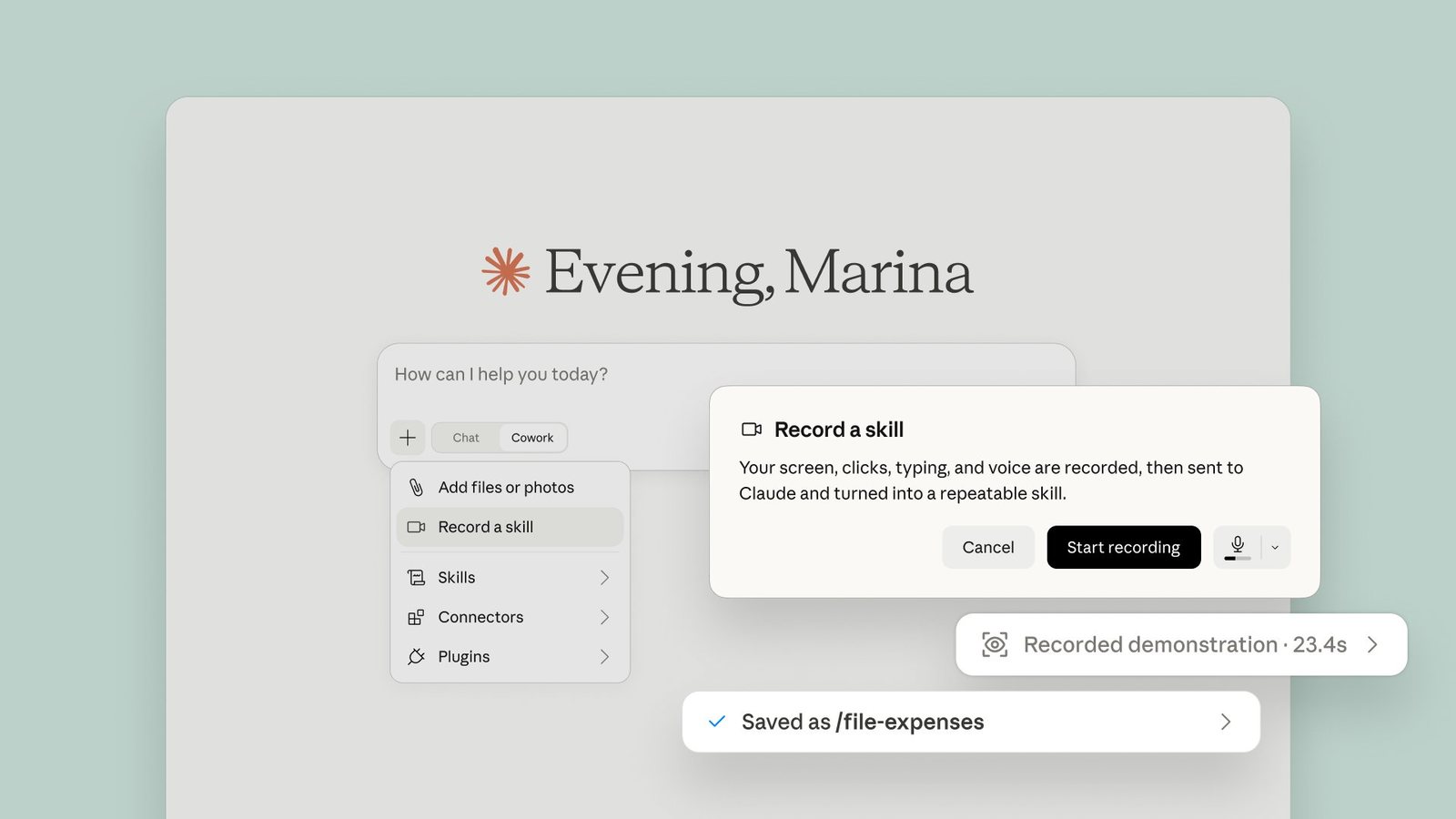
If the software already connects to Claude, do not record it. Just ask. Recording is for the software that has no connector at all.
This is not a limitation of the feature. It is what the feature is for. A huge amount of business software, particularly older systems and a lot of marketing tools, has no API and no integration. That has been the ceiling on AI automation for years. Record a Skill is the tool that goes over that ceiling, by driving the browser the same way a person would.
It is slower than a native integration. That is the trade. You accept slower in exchange for reaching software that could not be automated at all.
Before you record anything, ask one question: does this tool already connect to Claude? If it does, you do not need a recording. You need a sentence.
One precision, because it trips people up. Claude does not ignore your connectors while running a recorded skill. It works out the proper tool for each step, reading from connectors where they exist and driving the browser only where it has to. So the rule is not that it cannot use connectors. The rule is that if a connector exists, the recording was effort you did not need to spend.
A recording runs for about ten minutes. A countdown appears when roughly one minute remains, and it stops on its own at zero.
Most people treat that as a constraint to work around. It is better read as instruction. Ten minutes is not enough to record your job. It is exactly enough to record one decision.
So do not sit down to capture "how I do client onboarding." Capture the single repeated judgement inside it: how you decide which tier a new client goes into, or how you check a listing before it goes live. Small, complete, repeatable. That is the unit.
This is the part almost every tutorial skips. The microphone is optional in the interface. It should not be optional to you.
A silent recording gives Claude a sequence of actions. You get something that mimics your motions. A narrated recording gives Claude your reasoning, and you get something that carries your judgement.
The difference shows up the first time reality differs from the recording. A mimic freezes or does the wrong thing. Something that heard why can handle a case you never showed it.
Do not say "now I click the blue button." Claude can see that. Say the things it cannot see: why this option and not the other one, what makes you skip a record, what would make you stop and escalate to a human. The rules live in the audio.
Anthropic's own documentation warns not to type passwords or secrets, or display sensitive information or private conversations while recording, because everything on your screen is captured. Close what does not belong in the recording before you press start.
Worth knowing for your own peace of mind: the video and audio are not retained. Claude keeps a set of screenshots from the session. That is still your client list, your inbox previews and whatever notification slides in at minute six.
Practical version: quit your mail client, close every unrelated tab, turn off notifications, and use a test account where you can.
Claude assumes everything it sees is part of the job. Wander into an unrelated tab mid-recording and it will treat that detour as a step in your process.
Three habits that fix most of it:
You will find the dead ends before they get baked in.
No checking a message, no "let me just quickly." Finish the task, stop the recording.
Begin at the login screen or the dashboard, not halfway through with context Claude never saw you establish.
This one catches people out when they schedule a recorded skill and assume it behaves like a server-side automation. It does not.
Your Mac has to be awake and signed in for a recorded skill to run. Close the laptop and the scheduled run does not happen in the background.
The good news is that it fails safely rather than silently. In practice, if the machine is asleep at the scheduled time, it prepares the work and stops rather than publishing something half-finished.
| Limit | What it means for you |
|---|---|
| Mac only | Not Windows, not the web app, not mobile, not in chat |
| Pro, Max, Team | Free and Enterprise plans do not have it |
| About 10 minutes | Record one decision, not one job |
| Permissions first | Grant macOS Accessibility and Screen Recording before you start |
| Runs locally | Machine awake and signed in, or it prepares and stops |
| Where to find it | The + menu in a Cowork session, or Customize > Skills > Add |
All five share one property: no connector exists, so there was no way to automate them before.
Look at the dates.
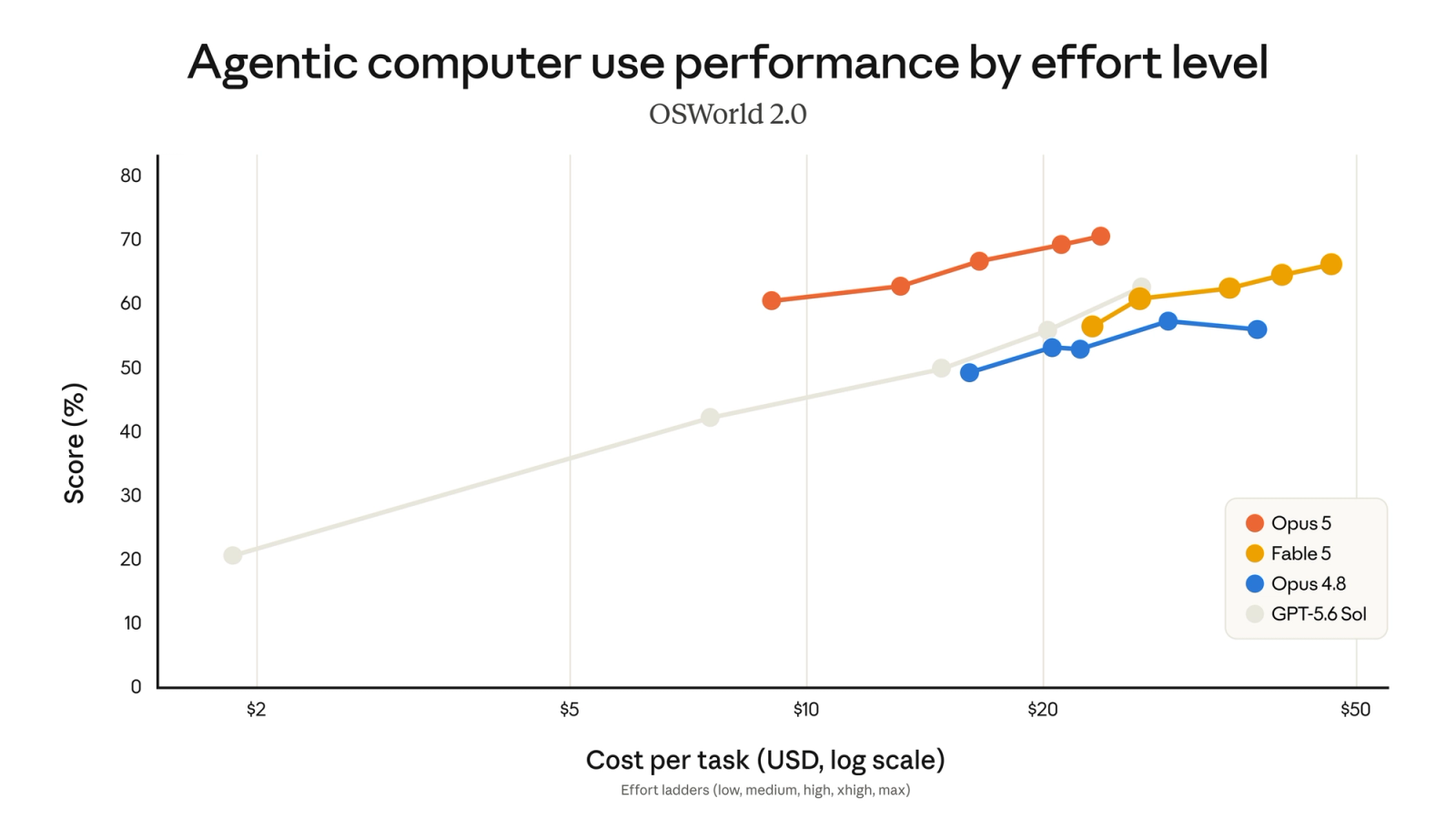
Anthropic has not publicly linked the two releases, and this is my read rather than their claim. But a feature whose whole job is driving a computer, followed three days later by the model that leads the computer use benchmark, is worth noticing.
They did not ship a screen recorder. They shipped hands. Then they gave it a brain.
Which is why the rule at the top matters more than it looks. Recording the tasks that already have connectors is not just wasted effort. It is aiming a genuinely new capability at the one category of problem that was already solved.
Muhammad Asmal
Founder of Asmal Digital. Head AI Faculty for John Assaraf's Mastermind for the past year, and AI Consultant for The Cave Network. Featured in Business Insider, Yahoo Finance and Dubai Daily.
I build AI systems that reason and adapt rather than follow rigid automations, for businesses that need the judgement as much as the speed.